Showing posts with label cameo3. Show all posts

Sunday, June 3, 2018

First Workshop at RRCraftHub: Hot Air Balloon Bouquet


I was preoccupied with Learning Oasis sewing workshop in the first week of May but I want to kick off a class at RRCraftHub. So, I made arrangement with Atie aka MekBungo to run a Hot Air Balloon Workshop. I helped her with the poster and we blasted the social media. It ran less than 1 week and we managed to gather 3 students for MekBungo’s maiden class.

Long story short, the students’ commented that the intro price of RM250 for the class is really value for money. MekBungo shared her tips and tricks on making the hot air balloons like

  • various types of clear balloons, price range, quality and where to get them
  • how to get the smaller balloons in the bigger balloon
  • how to make simple arrangement of a combination flowers and chocolates
  • how to finish the bouquet with sticker vinyl personalization and ribbon
  • and lots more!

Atie going through various types of balloons

Mother’s day hot air balloon bouquets

loving the red and pink combo by Scila of @scraft malaysia

Arwen gets a bouquet as the workshop falls on her birthday


I received a lot of request for the workshop but in view of Ramadan and the coming Syawal, I guess the earlier dates we can organize one will be end of July or early August. If you’re interested to attend the workshop, Please fill up this form and we will contact you to confirm your attendance. That is so we don’t miss out anybody.

Monday, March 12, 2018

Intensive Silhouette Training

I had another Intensive Silhouette Training session today (Sunday, 11 March 2018). From the pictures, the usual enquiries that I get is “Do you only teach how to make custom t’shirt and sticker vinyl?” Isn’t much of “INTENSIVE” there is it? I’ve been conducting the training for over a year now and it does get a bit tiring when you get the same question. Perhaps it’s high time for me to go into greater length in explaining what the course entails.


Training session on 11 February 2018 at The Craftsical

When I put together the training material, I had the basics in mind. For a newbie with zero experience with any of the Silhouette machine be it a Cameo or a Portrait; it will put you on a fast track to mastering your machine without the hesitation and waste of trial and error. I’ve gone through watching tutorials and reading SilhouetteSchool blogs and trying to find local materials to diy stuff. I’ve done my trial and errors in my first year of owning a Portrait which is back in 2015. I have been hands on with both Portrait and Cameo to know what they can do and I’ve tried some hacks to try and save corners here and there. In short, you can take  your time and go through the process like I do or you can sign up for my class and skip all the mistakes that I’ve made and be on your way to have a beautiful relationship with your machine. Either way, the choice is yours.

I didn’t get a Portrait or a Cameo for the reason to become an instructor to begin with. I’m a crafter at heart and I’m a gadget freak. I love my Portrait the minute I had my hands on it. I learned what I can and took my time on the learning curve. Over the years, I’ve shared my crafts made with my Portrait and some of my friends and IG followers knew I own a Silhouette machine. I made more friends when they DM me asking for helps in trouble shooting their machines, or finding the right settings to cut some materials. I’m always happy to help a fellow crafter. Last year, Zila Kasim, a friend bought her Cameo and asked me to teach her. I was happy to show what Cameo can do. After the session, Zila suggested that I go into Cameo sales and training and she gave me some tips on how to get it started. Long story short, she became my mentor and I started my Cameo business and training. It’s been over a year that I’ve run training sessions on a monthly basis and do private training on site when my customers couldn’t come for group class. 

Anyway, what do I teach in my class? Well, I cover:
  • Registration with Silhouette America and claim USD25 complimentary 1 month subscription. 
  • Setting cloud account for Silhouette Studio.
  • Introduction on the Silhouette Studio software
  • Get free designs from Silhouette Design Store and saving it into cloud account
  • Basic cut on cardstock
  • sketch and cut function, using the dual carriage on Cameo3 and pen holder (additional accessory)
  • cutting sticker vinyl to personalise the cameo/portrait-how to transfer the design with transfer tape
  • Trace function; tracing design from other sources and converting it into a design for Cameo/Portrait to cut.
  • Cutting HTV for a custom t’shirt
  • Print and cut; understanding the importance of registration marks
  • Cutting custom sticker
With that, I include:
  • A t’shirt
  • A 12”x 20” PU HTV 
  • A cardstock
  • 12”x12” sticker vinyl in assorted colours
  • Printable heat transfer paper for light material (A4)
  • Printable heat transfer paper for dark material (A4)
  • Glossy sticker paper (A4)
  • Matte sticker paper (A4)
  • A list of local suppliers 

The next question I assume is how much does all these cost? 

I think it should be in the region of RM500 to RM600 but my fees are only RM300 and a further rebate of RM100 if you purchase your Silhouette Machine from me and I throw in a set of toolkit which is valued at RM84! If that is not a good deal than I don’t know what is! For one thing, the USD25 is most of the time goes unclaimed and for my participants, I’m actually giving free money worth RM100 for you to buy designs on the Design Store. I even include lunch during training. 

So, if you already own a Cameo and still finding your way with using it; or you’re thinking of getting one but hesitate if you can’t manage it, drop me a line or sign up for my training session. I posts my class schedule on my instagram and in my estore. I’ve seen how my participants have turn their machines into money making machines in no time. I’ve had feedbacks that some of them have covered their investment in the Cameo within one and a half months! But if that’s not your concern, that’s OK, you can just be like me and enjoy making stuff with your Cameo/Portrait. When you know how to use your machine, you are only limited by your creativity.

Saturday, March 25, 2017

Tutorial: Cameo3 Dust Cover


I finally managed to check Cameo3 dust cover off my to do list. I made mine from unbleached cotton drill and cut out some scrap HTV to decorate. It’s quite simple to make and here’s the tutorial if you want to make one for your Cameo.

You need:
3/4 yard or 3/4 meter of fabric
sewing machine
serger (optional)

Instructions:

From the fabric, cut one piece measuring 23.5” by 18.25”

Then cut 2 side panels. The template can be downloaded here. If you want to cut out the template, the studio3 file is here.Print in actual size. Use the 1” square for sizing gauge.


Line the short edge (front) of the side panel to the short edge of the main panel as shown in the picture below.


Mark 0.5” from the edge.


It should look like this:


Fold the side panel fabric where the marking is and snip the material. Be careful you don’t want to snip more than necessary. This snip will make pivoting the material easier later.


Once you’ve snipped it, it would look like this:


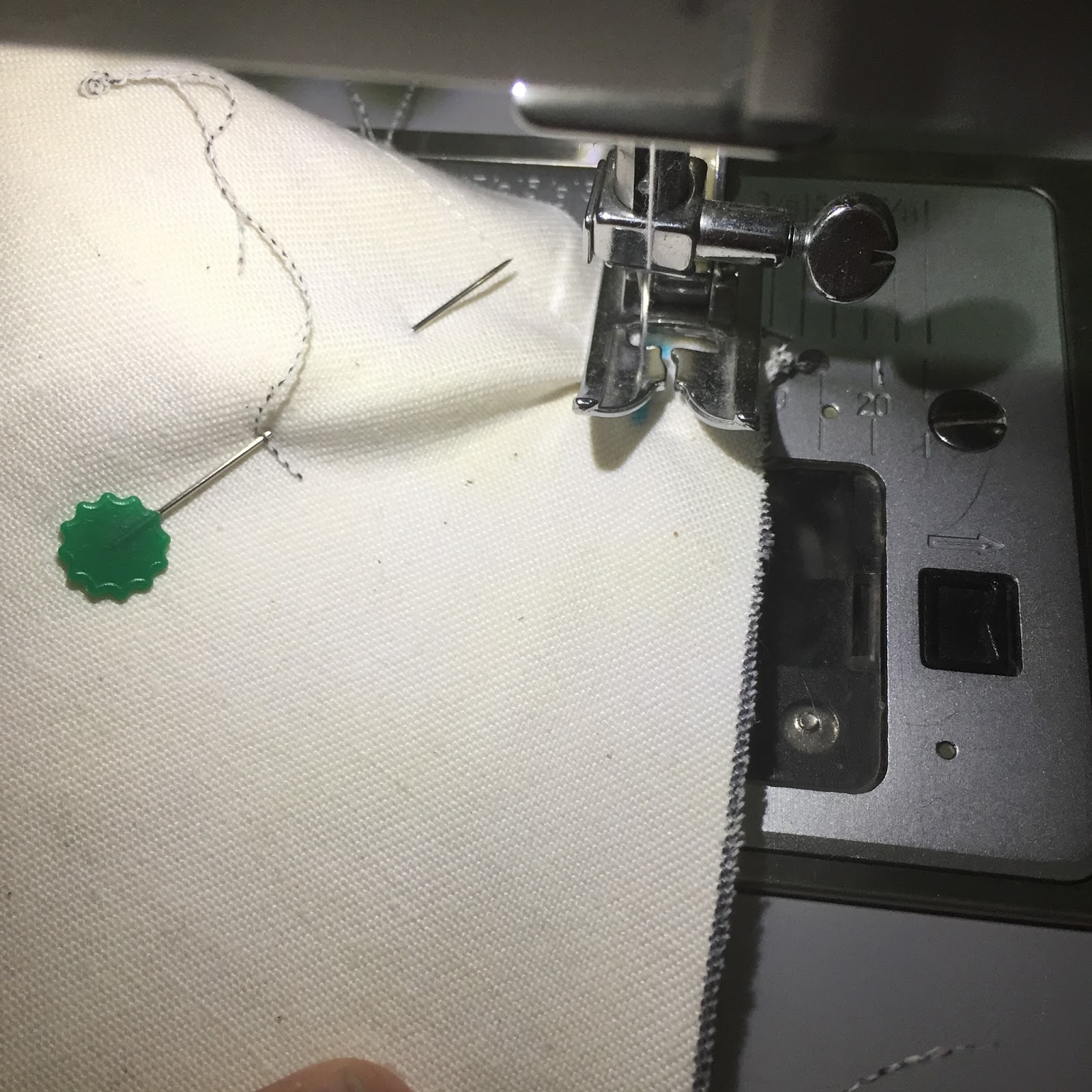
With 0.5 seam allowance, start stitching from the bottom until u reach the mark. Stop with the needle in the down position.


 Pivot the top material (side panel) so that the edge is lined parallel to the foot. At the same time, pivot the bottom material (main panel) so it’s in line with the top material.


The top part of the side panel is curved, so line both material and stitch them together; adjusting the back material to the curve. Continue until you reach the other 0.5” mark from the edge. Stop with the needle in down position and do the pivoting again.


 Continue down the side panel until you reach the edge and reverse stitch.


This is how it would look like. Repeat with the other side panel. IMPORTANT: make sure you check and double check that the side panels both face the same direction


I serged the seam:


I serged the bottom of the dust cover too:


On the wrong side, I fold in the edge 0.5” and pin it all around.


and stitch around the bottom of the dust cover. That’s it. Press and you have yourself a brand new dust cover.


 I made mine with unbleached cotton drill. You can dye the cover any colour you want or embellish it with applique or HTV like I did mine.


I even made the packaging for my dust covers with the sketch and cut function.

I hope the instructions are clear and easy to follow. Just drop me a line if you need any clarification. If you don’t sew, I can sew them for you. The introductory price is RM20. Please bear in mind that this pattern fits Cameo3. From what I heard Cameo3 is slightly bigger than its predecessors.

Next: Tutorial for Portrait Dust Cover

Monday, March 13, 2017

Cameo Tutorials on Youtube

Now that I am a non-exclusive distributor for Cameo and Portrait, I’ve been doing a few tutorial videos to help new Cameo/Portrait owners with their projects. You can check out my Youtube channel here. If you do check out my channel, I appreciate if you can click on “thumb up” and “subscribe”.  I’m still tweaking and feeling my way about in Youtube so bear with me.

Here is one to guide the new owners on how to register their Silhouette so they get the complimentary one month subscription worth USD25. That’s a lot of money in MYR


This is how I use Embrilliance software to create a cut file on Silhouette Design Studio for applique.


This is a video on pen holder/adapter. It’s included in the Cameo3 Crafter’s Bundle.


This is a tutorial for Etching Cream. 


Cutting Felt with Cameo:


Cutting a plastic sheet for a clutch template:


A sketch pen hack. How to make sketch pen fonts from normal fonts. I did this in English as it was requested by the group members of Silhouette Cameo Project Inspiration in Facebook after I showed them a video of my faux chalkboard writing on black card stock.


I’ll be adding more videos to my Youtube in the future. As most of my videos are intended for local viewers, the medium of delivery is Manglish (Malay and English combination). I plan to add English subtitle to my videos.

If you want me to do a demo video about cameo, let me know and I see if I can work something out.

By the way, did I tell you that my Portrait has a new friend? Yep, I got myself a Cameo3 last February. After all, I need it for class. There’s a new set of ball game especially with the dual carriage and the automatic blade. Love it!


What Happened To February?

Time flies! I put off my blog entry only to realised that it’s already March. Gosh! What happened in Fabruary? Well, I wasn’t feeling so good health wise and long story short, after 43 years of life, I now am on BP medications. Well, life goes on. 

On to the more interesting things. My first Baby Announcement Pillow order for the year. I am now doing the embroidery onto cotton drill material. It’s sturdier and takes on the embroidery well; less puckering. To order, drop me a line at rozirahman@gmail.com or whatsapp me: 0122038117. The price is RM45.00 for a non removable cover pillow and RM65.00 for a separate cover and insert.


I’ve been using Silhouette Portrait for almost 2 years now and have been under the radar. Then one day, Zila Kasim asked me about Cameo and I gave her my opinion. She went and got herself one and asked me to come over and teach her. I am always happy to share with a fellow crafter and we had a pleasant afternoon discovering the Cameo3.

Immediately Zila asked if I would like to do a demo because she sees the potential of Cameo3 for the crafters. I jumped at the idea and we arranged a collaboration for a Demo Party to be held at her studio, LamanSeniZilaKasim.

There was a decent turn out and we had fun. Gathering with like minded people is alway refreshing.
Here’s a group photo of almost everybody. Some left earlier.


The Cameo3 and Portrait was very well received and I’ve taken the initiative to become a non exclusive distributor for Silhouette Malaysia. I’ve also managed to get a Kutu group going for both Cameo3 and Portrait. More info and updates on my Instagram and Facebook page: madebyrozirahman.


I was at Spotlight The Mines on 18-19 February, helping out with the Super Sewing Weekend. I made some simple hand puppet sample for the sewing challenge. The templates are from here.


This is the picture of the lucky winner whose baby I helped pacify when he was screaming his head off while mommy trying to sew a hand puppet. Love having that brief moment with a baby again, even it’s someone else’s baby.


I started to collaborate with a very creative friend who makes hantaran for engagements and weddings. My contribution is the card tag on the hantaran :) If you’re interested in her work, check out her instagram: ryta_khan. This talented lady does flower arrangements and fabulous cakes too. 


Did my combo class at The Craftsical on 25 February 2015. Nieza’s hero modelling a custom t’shirt made with HTV and my telekung student with her telekung. 


 Arwen got invited to a classmate birthday party on a week night. The invitation was broadcasted by her class teacher and I made a quick birthday present for her friend. A simple cotton drill bag (unlined) with personalisation of her name with HTV. A small note from the giver on the inside of the bag. I do take orders for customisation. A simple bag like this would start at RM25.00. Drop me a line if you wish to order.


So, that pretty much wrap up my February. I now find a renewed reason to keep my blog active. As I age, I find keeping records help my failing memory. I will keep on archiving my activities here in the blog for my personal reference. I’m glad if you finds my blog read-worthy. I don’t get much of a response from my blog so I won’t know if anybody actually do read them. 


Nuffnang