Showing posts with label photography. Show all posts

Wednesday, March 14, 2018

Photography for Crafters; Portable Lightbox Review

I ordered this contraption ie. Portable Lightbox a couple of days ago and it came through the mail yesterday. I quickly put it to the test and thought I'd do a quick review on the product.

I ordered the 40cm x 40cm x 40cm size.

Plus points:
  • It comes with a bag.
  • It has led lights
  • 2 backdrops in black and white
  • Fully collapsible so it's space saving


Minus points:

  • not so sturdy but it gets the job done. It's held together with magnets and they're not so strong.  You have to bend the flaps out so that it sits up better.


Below is my first shot with an iPhone6. No touch up. The lights gives a blue hue to the white background. That's OK. Good thing for me, I'm a sucker for photo-editing. It's made even easier though a mobile phone apps.


I use Snapseed to correct the white balance, adjust the lighting, ambience and add some saturation to the picture.

Next I opened it in PicLab to add the text and it's done!


Since we're already on the topic, I would also use Canva to edit my photos for my estore.


So the verdict; I'd give it a 3 out of 5. It is suitable for small items like a small purse, a wristlet, keychain and the likes. If your products are bigger, it is better to set up a small place for photoshoot or take your merchandise outside for an outdoor photoshoot.

I like it because it soften the dark shadows so I don't have to think about bouncing light with a reflector to reduce the dark sides. I used to be so obsessed in not having shadows on my product pictures but then I realised that it actually adds dimension to the photo. So, shadows are OK. just not too dark.

I think I need to add a disclaimer here. All opinions are my own. I am not an expert in the field of photography but I do have keen interest in them. I started my photography journey because I admire the photos in other craft blogs. They look so fresh, crisp, bright. I started with grainy photos from my mobile phone, to a cheap compact, then to a micro four thirds camera and now mostly with iPhone. I find that mobile phones nowadays produce exceptionally good photos; well good enough for social media posts and it's convenient to edit the photos with photo editing apps compared to photoshop.

So, there you have it; my take on the portable lightbox. Maybe in not so distant future, I'd cover a bit more on photography for crafters, say outdoor photography? yay or nay? Let me know, OK.

Thursday, February 9, 2012

Scrappy Heart Mug Rug and a bit about photography


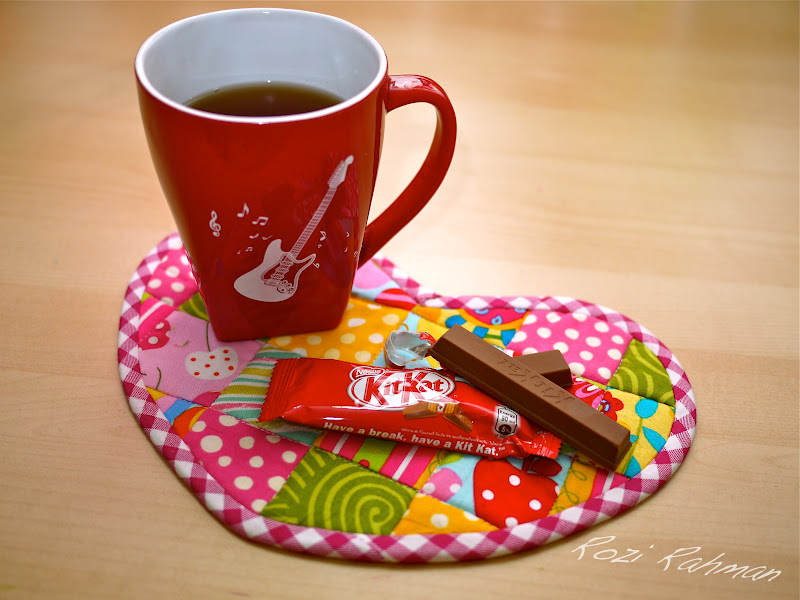
I made this scrappy heart mug rug last night. I love my scraps too much to throw them away and keep even the smallest piece that they got out of control. So in attempt to tame my unruly scraps, I made this quick scrap busting project last night and made another one this morning. It’s super fast. The blocks are 2.25” squares with 0.25” seam allowance. The mug rug finished approximately 9” wide by 7” height. 


Recently, in one of my Facebook craft group, there was a discussion about how a good photo makes an impact especially for online craft business. Needless to say, it’s the only form of communication to the potential buyers other than what other information that you provide in text form. 

I for one, pay a great deal for my photos. I’ve come a long way from photos taken from my handphone and uploaded here (yes, this same blog) to my current pictures. I learned a lot too. I love reading from blogs with great pictures, namely, lbg studio, Randomness by Petchy, Made by Rae, Made, and lots more. When i started blogging, I admired Maya and Zura Lovemelots for their photos, not just their crafts. I get inspired to make my pictures as good as theirs. Here are of my how tos on taking pictures:

Gone were the days that I took one shot and expect it to be a perfect shot. I took several shots at different angles. Don’t worry about shutter count. Most of us are using digital cameras now so, if you don’t like a shot, you can just delete it later. Here are some of my shots before I get to my favorite shot:

First shot: no flash. It was early in the morning. The sun is not out yet. The source of light is the florescent light on the opposite wall. 

With flash on. Too harsh

I tilted the flash on my GF2 so it bounced off the wall to create a warmer, more natural tone. 

Post editing is optional. Minor touch ups to straighten the picture, enhanced contrast, saturation, highlights and reduced shadows. I did this all in Iphoto. No fancy software. I only used Photoshop Elements 9.0 to add my watermark. I used to spend hours on editing alone but I’ve mellowed and followed my brother’s words of advice, ‘Simply photography, not simply photoshop’. Less is more.

I do believe post-editing is important. It’s like make up. You can do without but you’d look much better with a touch of lipgloss and some powder on your nose, don’t you agree?

My tips:
1. go for natural light as much as possible but if you can’t get any, don’t fret. work within your limitations. I shoot at all hours of the day, day or night. I work with artificial light. Don’t get intimidated with flash. Make it your friend. Work with it. Learn how to handle it, Bounce it off the wall or diffuse it. 

2. Composition and angle. I believe this is a learned art. You don’t have to be gifted to be able to take reasonable nice photos. Have fun with it. Experiment from different angles, different perspective. Don’t just take straight shots. You might be pleasantly surprised to see the results. Add props and different backgrounds to highlight your product. 

3. Post Editing. I think I’ve covered that.

4. It’s a learning process. Practice makes perfect. Keep on learning. Take out your camera and take pictures. Lots of them. Learn about your camera and what it can do. Don’t just go on Auto mode.

I’m in the mood for more of these mug rugs. I might just add a tutorial for it. Till then, take a break, have a KitKat  :) 


Wednesday, February 16, 2011

NYC Cab revisited: A fresh perspective

I made a post about my knitted toys here at the beginning of this blog and the photos were taken from a camera phone. As today is the theme day for DSLR Kelab Malaysia, and the theme is ‘vehicles’, so I shot this, this morning. The photo does justice to this little cutie :)

I’m slowly turning this blog as a gallery for my photography as well. How it has evolved... One of the main reasons I took up photography more seriously was for this blog. To have better pictures. I’m glad I did and I’m having fun doing it.

A big about Kelab DSLR Malaysia. It’s an open group on Facebook and I was invited by a friend. They have 1 Hari 1 Foto assignment which is in line with my Project 365. You get to post only one photo a day and have members of the group comment on your picture. I can really see a lot of improvements in my shots from my earlier ones in my personal project. At the end of the day, the admin will choose a few best pictures and have them in the Wall of Fame for the day. I am elated to have mine chosen twice! It’s here and here. What more, it’s challenging to compete with photos of nature, sunset, sunrise, macro shots of bugs and what have you. Mine were more on still life and the stuff in my sewing room. So, to be picked into the Wall Of Fame is really an honour :)

And if you’re interested to view my Project 365, you can go here: http://www.flickr.com/photos/danialraziq/sets/72157625671861223/


Friday, January 28, 2011

Sewing Room Inspirations

For 2011, I’ve decided to ‘sharpen' my photography skills by committing to a project 365. It’s a project where you take one picture a day for a year, thus at the end of it you’ll have 365 great photos (hopefully). Go to flickr.com and search ‘365’, you’ll find a lot of similar projects and fantastic photos.

January hasn’t end yet and I was struggling with this project. Finding object, things to shoot and I am losing focus. It was the boost I needed when my brother from Singapore called to speak with his niece and nephew and of course me, his only sister. He is my mentor and advisor for my project. He’s the one who got me hooked onto photography in the first place. You can view his work at http://www.flickr.com/photos/shaztech/

Anyway, he commented that my project needed an edge. I’m just taking straight shots, no ‘rule of thirds’, no DoE, yada, yada, yada. Ouch! yet, he’s right and I was all eager for a suggestion to get me back on track. He suggested that I go to my sewing room and take pictures of the things in there. Duhhh!!!! Why didn’t I think of that?! Plus, when I went to flickr for some ideas, I stumbled upon some 365 pictures of sewing and crafting stuff which are really nice (check it out here). 

So, I decided to do a feature on my sewing room starting off with this photo of a bunch of embroidery threads I took out from my box. I switched the palette setting to Expressive to get the vibrant colors. Minimal post editing with Photoshop (cropping, color correction, etc). This was taken at around 3.30am when I can’t go back to sleep after comforting Arwen from a bad dream at 2.30am.

Better try and get some sleep now. TGIF!

Sunday, December 19, 2010

Itsy Doodles Gang Came To Visit


I got back to Putrajaya from my mom’s in Setiawangsa at about midnight. i was so sleepy and nodded off in the car. When we reached home, both kids were fast asleep and we took a child each up to bed. After all that, I tried to sleep but it’s no use. Mata dah merajuk. I’m wide awake. I was surfing in the darkness on my Ipod hoping to get sleepy again but instead, I’m more awake than ever. So, I checked out a few websites, sent some emails and organized my photos. I came across these set from Naza and kids’ last visit a couple of weeks ago and decided to edit and post it here.

Naza and kids had visited us before but it never crossed my mind to take pictures or mention about it here. This time, Naza asked to check out my camera and we shot a few pictures here and there. Here are some of Akif, Naza’s youngest. Teruna pemalu nih :)

Here’s one of a dusty flower arrangement on my side table. Showcasing the camera’s ‘bokeh’ effect. I edited this shot with Photoshop Elements 9 for the extra contrast. Read about my camera and Photoshop Elements here.
Thank you for the visit Naza and gang. I hope you don’t mind me putting up Akif’s photos here.

Popular Posts

Nuffnang